New in Eloqua
“26D” Update Features & Details
As of Saturday, November 14, this latest Eloqua system update brings us:
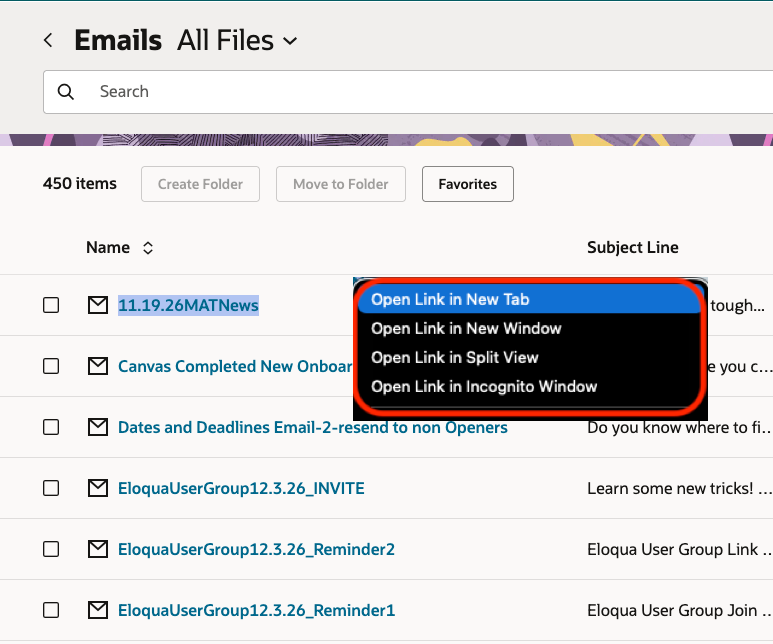
New in-Eloqua browser window/tab functionality:
A simple right or alt-click now gives us the ability to open Assets from Launch Pads in a new browser tab, making it easier to work on multiple assets at once. Create and edit an email in one window, open and launch a new Segment in another window and more easily start a new Campaign to tie them together, for example. And a “Split view” (looking at two tabs, side-by-side in one browser window) can be created to make it even easier to work on more than one Eloqua feature area at a time.
Search “Globally” for Assets and Orchestrations:
We can now use the Eloqua search glass (aka “Global Search”) to find any Eloqua elements by Name, Status, Created date, Last modified by (user name), and Created by (user name). If you haven’t used Global Search before, it can be found in the lower right navigation bar near your user initials:
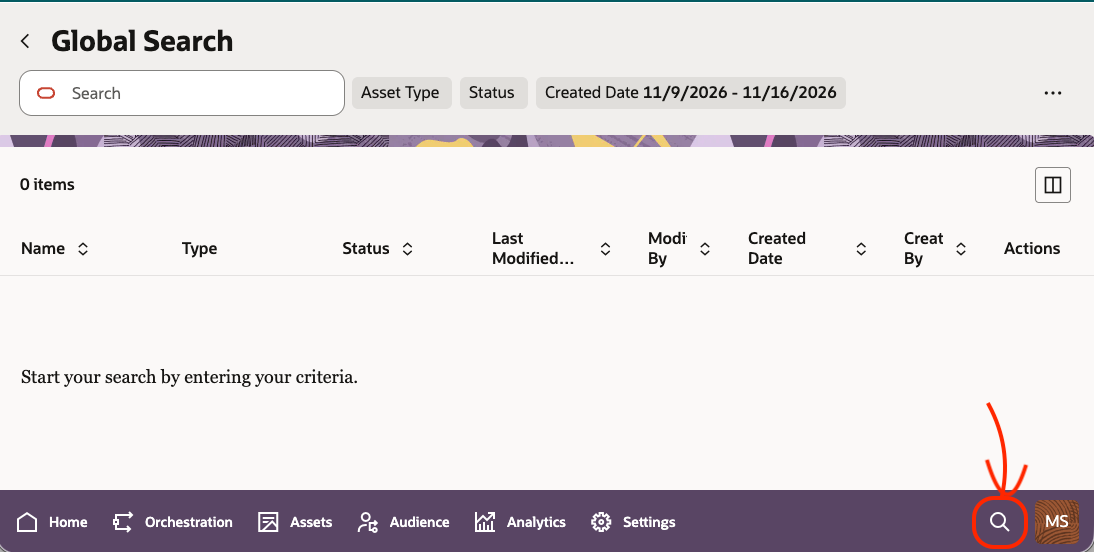
Start by typing a user name in the search field to find all elements created by that person, for example, and/or use the Asset Type, Status or date filters. You will still only be able to access assets and orchestrations you have permission to view, however.
Improvements to Email engagement data:
Enhanced auto-click detection (Oracle is constantly working on this) will improve identification of automated clicks and reduce false positives. New reporting metrics provide deeper visibility into sends, bouncebacks, form submissions, and tracking status. The enhanced model evaluates multiple characteristics of a click sequence to detect a broader range of auto-click patterns (non-human made clicks), and reduces false click activity caused by rapid double-clicks. Helps us interpret click engagement with less noise from automated click patterns.
New Multi-step Campaign Canvas experience to come December 1:
There will be a completely new “Redwoodized” look to the Multi-step Campaign Canvas with the same classic functionality. We will have the ability to copy/paste steps or whole sets of steps––even between campaigns and browser tabs/windows, plus a few new Campaign fields, settings, favorite steps, notes and validation error drawers.
What is an Eloqua Quarterly Update?
If you’re new to Eloqua or just as a reminder: As of Saturday, November 14 our campus instance has received the latest Eloqua updates, for the fourth time in 2026, known as “26D.” Oracle updates the application four times each year with feature enhancements, bug fixes and other improvements.
We’ll demonstrate these updates in our next Eloqua User Group meeting on December 3.